
Introduction
────────────────────────
Android boot loop after update describes a condition where an Android device repeatedly restarts immediately after a system update and never reaches a usable state, even though basic recovery actions such as a factory reset have already been attempted.
The phone turns on and shows the boot logo.
Moments later, it restarts without warning.
This sequence repeats endlessly.
As a result, progress never advances to the lock screen.
Setup does not resume.
Normal interaction has no effect.
At this stage, the update process has already modified core system components.
The boot sequence fails before Android can hand control to user-level recovery logic.
However, this behavior is not a short delay.
It is not related to temporary cached data.
In practice, clearing user storage alone does not change the result once this state is established.
At that point, once this pattern appears, the device has already crossed a system recovery boundary where standard user actions stop influencing the outcome.
Note that the exact behavior may vary slightly depending on device model and manufacturer.
────────────────────────
Step-by-Step Guide : android boot loop after update
────────────────────────
────────────────────────
Step 1: Observe the exact restart point
────────────────────────
Pay attention to when the restart occurs.
If the device reboots before reaching the lock screen, the android boot loop after update is typically happening during early system validation.
At this stage, Android is verifying system and vendor partitions rather than loading user data.
Therefore, a factory reset does not interact with these partitions.
It only clears user-level storage.
In this case, when the loop occurs this early and remains consistent, reset logic never gains effective control over the boot process.

────────────────────────
Step 2: Confirm recovery actions complete normally
────────────────────────
Enter recovery mode and perform a factory reset.
If the reset finishes without errors but the boot loop continues in the same way, the reset mechanism itself is functioning as designed.
The underlying system, however, is no longer able to boot successfully.
As a result, this strongly suggests that stored user data is not the trigger.
The failure exists within the active system image produced by the update.
Repeating the reset simply reproduces the same internal result.
────────────────────────
Step 3: Check whether safe mode can be reached
────────────────────────
Attempt to boot into safe mode.
If safe mode cannot be accessed, Android never reaches the phase where third-party applications are evaluated.
This removes installed apps from the list of likely causes.
As a result, when safe mode is unavailable, the failure occurs before application-level checks begin.
────────────────────────
Step 4: Understand why factory reset cannot repair the system
────────────────────────
A factory reset does not reinstall Android once an android boot loop after update has already formed.
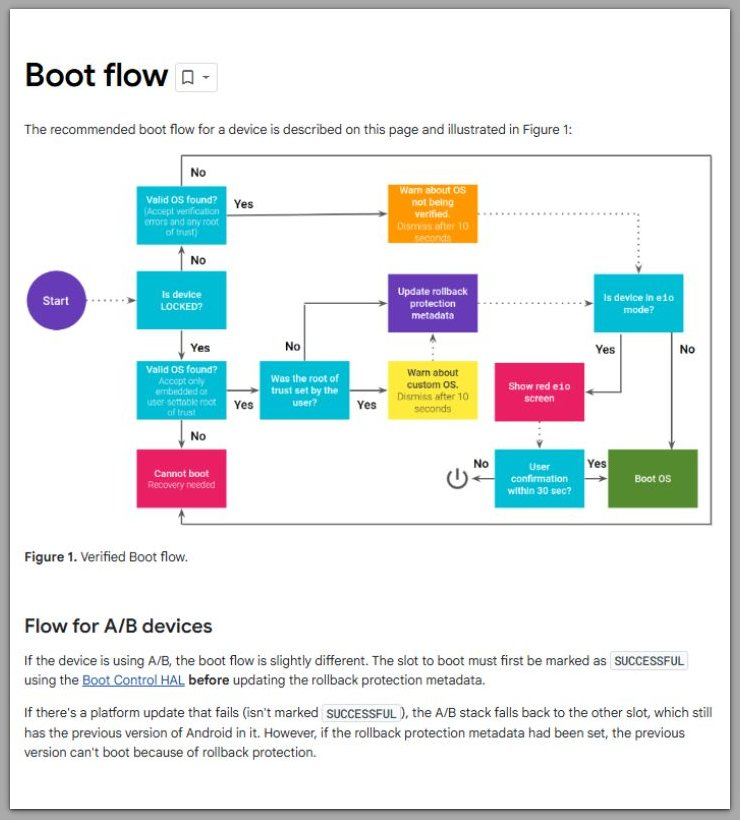
It does not rebuild verified boot components.
System updates modify protected partitions, including system and vendor images.
If these components become incompatible or corrupted, standard reset tools cannot correct them.
Once the update finalizes these changes, rollback is no longer available through normal recovery menus on most consumer devices.
If the boot loop continues at this stage, standard recovery options no longer apply. At that point, the issue has moved beyond user-level control and requires external intervention specific to the device.
Android device won’t turn on or keeps restarting — Android Help
────────────────────────
Troubleshooting
────────────────────────
────────────────────────
Restart happens at the same visual point every time
────────────────────────

Observe the exact moment when the restart occurs.
Some devices reboot immediately after the boot logo.
Others restart a few seconds later, after a brief screen flash.
What matters, however, is not how quickly the restart happens, but whether it happens at the same stage every time.
When the reboot point does not move, the android boot loop after update is repeating a fixed internal decision.
As a result, this indicates a deterministic validation failure rather than random instability.
────────────────────────
Factory reset completes but changes nothing
────────────────────────
Recovery mode may report a successful factory reset.
No error message appears.
The process ends normally.
Despite this, the boot loop resumes exactly as before.
This confirms that the reset process itself is not failing.
The system simply has no usable state to continue into after the reset completes.
────────────────────────
Safe mode is never offered
────────────────────────
Some boot failures still allow safe mode access.
In those cases, Android reaches the application evaluation phase.
When safe mode is never available, the system does not reach that stage at all.
The failure occurs earlier, before app-level logic is initialized.
This effectively rules out third-party applications.
────────────────────────
Recovery options repeat identical outcomes
────────────────────────
Power cycling, extended charging, and repeated resets all lead to the same result.
No variation appears between attempts.
This consistency shows that the system state is not evolving.
Each boot attempt follows the same internal path and stops at the same boundary.
────────────────────────
Additional Tips
────────────────────────
Leaving the device powered off for extended periods does not alter boot validation logic during an android boot loop after update.
For this reason, time alone does not restore damaged system partitions.
Switching chargers or cables does not influence verified boot checks.
Power delivery is rarely involved once the boot sequence begins.
Battery level does not change the validation process itself.
The system fails before power-related safeguards become relevant.
Avoid repeated forced restarts.
They increase hardware stress without changing software behavior.
────────────────────────
Final Notes
────────────────────────
An android boot loop after update that persists through a factory reset reflects a system-level failure rather than a data-level issue.
At this point, all user-accessible recovery paths have effectively reached their limit.
Therefore, the device continues restarting because it cannot complete its verified boot sequence.
Recognizing where this boundary exists helps prevent unnecessary repetition of steps that no longer influence the result.
────────────────────────
Checklist
────────────────────────
☐ Restart point is consistent
☐ Factory reset completes successfully
☐ Safe mode cannot be accessed
☐ Boot behavior does not change across attempts
When all items apply, standard recovery options no longer affect the outcome.
────────────────────────
Extra Section 1
────────────────────────
In general, Android system updates rewrite protected partitions as part of the installation process.
These partitions include the core system image and vendor-specific components.
Once the update is finalized, verified boot expects structural consistency during an android boot loop after update.
Any mismatch causes the boot process to restart rather than continue.
Factory reset does not replace these partitions.
It only clears user data and settings.
This separation is intentional and security-driven.
It prevents unauthorized modification of system components and protects device integrity.
────────────────────────
Extra Section 2
────────────────────────
Different manufacturers implement update validation differently, but the underlying model is similar.
Whether the device is from Samsung, Pixel, or another vendor, verified boot enforces strict consistency.
When the system image fails validation, the boot process cannot advance.
By design, user-facing recovery menus are designed for configuration and data correction.
They are not designed to rebuild operating systems.
Firmware reinstallation typically requires authorized tools and official images.
This process exists outside normal consumer recovery workflows.
Understanding this limitation explains why repeated resets feel ineffective.
The device is not ignoring commands; it is enforcing its boot integrity rules.