
Introduction
Android battery problems often start with small changes before a clear failure appears. The phone drains faster, charges slower, gets hot more often, or loses power even when the screen is off.
These signs alone rarely prove the phone needs a new battery. The real cause often comes from the charger, apps, signal, heat, recent updates, or daily use.
A replacement decision needs more than one symptom. Each sign points to a different cause, so one symptom alone is not enough for replacement.
This guide brings the main Android checks together. Use the steps below to compare health, charging, heat, active-use drain, and screen-off drain.
Step-by-Step Guide: Android Battery Problems
Step 1: Check Android Battery Health Before Replacement
Start with the condition reading before you decide the battery has failed. A weak result matters most when it appears with faster drain, slower charging, heat, or early shutdowns.
Open the status or diagnostics screen on your phone. Some Android models show the condition inside Settings, while Samsung phones use Samsung Members for a separate check.
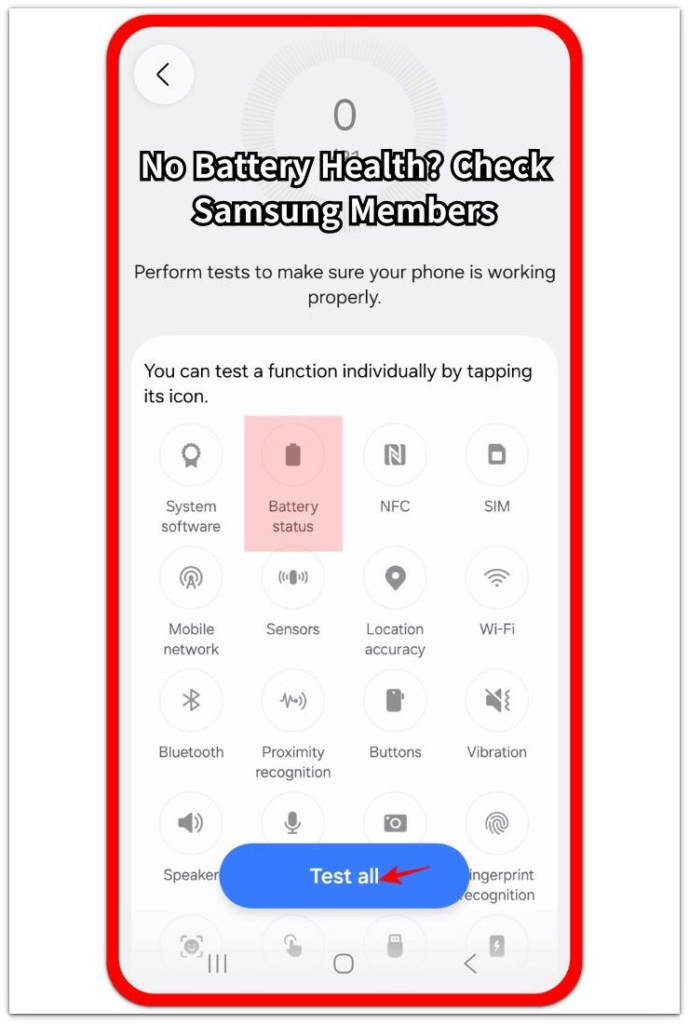
Read the result with daily behavior, not from one screen alone. A low or weak reading needs to match real use before you treat the problem as battery failure.
For a deeper check, compare this step with the Android Battery Health guide when the health result looks weak or unclear.
Step 2: Check Charging Speed And Charger Behavior
After the condition reading, a slow charge alone rarely proves battery failure. The problem often starts with the adapter, cable, port, heat, or background use.
Use the same charger and cable for the first comparison. Watch whether the percentage barely moves, stops at one point, or only improves when the screen stays off.
Heat changes charging behavior quickly. If the phone gets warm while it charges, let it cool down and check again before judging the battery itself.
For the full slow-charge guide, compare this step with the Android Phone Charging Slow guide when speed is the main symptom.
Step 3: Check Heat Before It Becomes a Bigger Problem
Watch when the phone gets hot before treating the problem as simple battery drain. A phone that gets hot too quickly often loses power faster, charges slower, and feels unstable during daily use.
Check when the heat appears. Any of these situations puts more stress on the phone than light use: gaming, navigation, video calls, mobile data, fast charging, or direct sunlight.
Let the phone cool down before you compare the result again. If the heat returns during light use, treat overheating as a separate warning sign instead of focusing only on the percentage drop.
For the full overheating check, compare this step with the Android Battery Overheating guide when heat appears before the battery percentage drops.
Step 4: Check Fast Drain Before Hardware Repair
Judge the drop through normal use instead of the percentage alone. A phone that loses power quickly needs a closer look at apps, screen time, signal, sync, and recent updates.
Open the battery usage screen and look for the biggest change first. A single app, service, or setting often explains the drop better than the battery itself.
Compare the drain with that day’s use. Heavy screen time, poor signal, navigation, video calls, or background activity changes the result before hardware failure becomes the main issue.
For the full guide, compare this step with the Android Battery Draining Fast guide when the drop happens mostly during active use.
Step 5: Check Screen-Off Drain Before You Suspect Battery Failure
Watch what happens when the phone sits idle. A drop during standby points to a different problem than fast drain during screen time.
Look at overnight loss, background activity, signal strength, Bluetooth devices, and recent app changes. A phone that loses power while idle often needs a separate check from normal daily use.
Compare the drop after the phone stays still for a few hours. If the screen stays off but the percentage keeps falling, focus on background activity, weak signal, sync, or connected features before judging the battery itself.
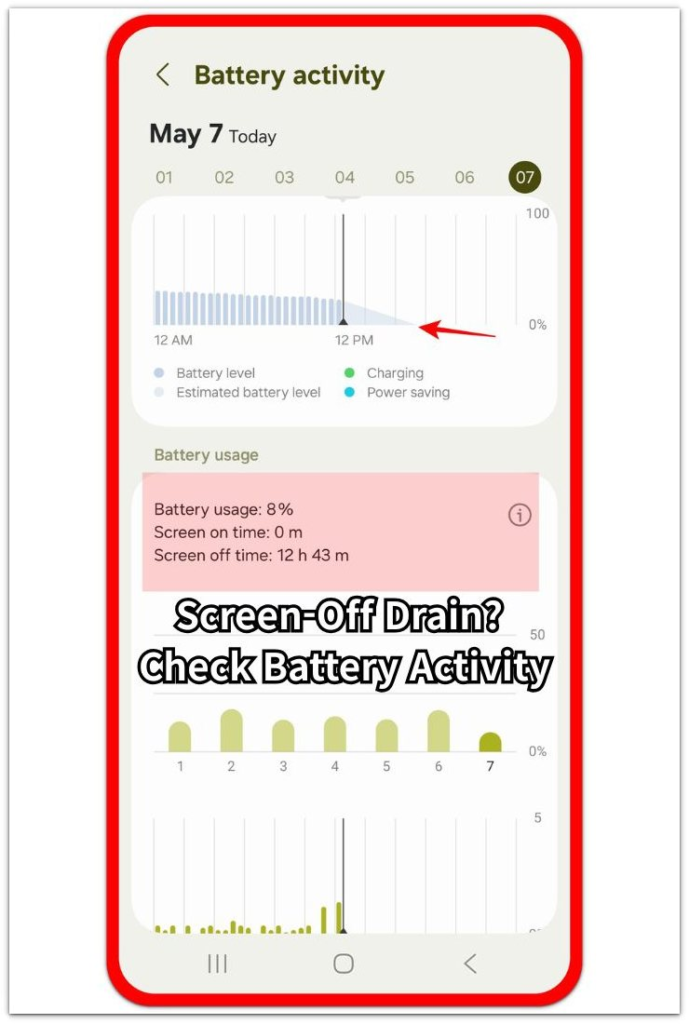
For the full screen-off drain guide, compare this step with the Android Battery Drain When Not In Use guide when the drop happens mostly while the screen stays off.
Troubleshooting
Troubleshooting 1: The Phone Drains Fast But Charges Normally
Daily-use drain often points away from charging failure. The phone still charges at a normal speed, but the battery percentage drops faster than expected during screen time, calls, navigation, or app use.
Because charging still works normally, separate active-use drain from charging failure first. Compare the drop with the moment it happens, such as calls, navigation, video, or one long app session.
When one app, navigation, video calls, or background activity matches the drop, check that area first. If charging still works normally, treat the issue as active-use drain before blaming the battery itself.
Troubleshooting 2: The Phone Charges Slowly And Gets Hot
Slow charging with extra heat needs a charger and temperature check before you treat it as battery failure. The phone feels warm while it charges, and the percentage moves slowly or pauses during charging.
Use the same adapter and cable, remove a thick case, and let the device cool down before you check again. Heat changes charging behavior quickly, especially during fast charging, gaming, navigation, or background activity.
When charging improves after the phone cools, heat or charging conditions explain more than the health reading alone. If slow charging continues after cooldown, return to the charger, cable, and port.
Troubleshooting 3: The Battery Drops While The Screen Is Off
A standby drop needs a different check from fast drain during active use. The phone loses power overnight or after a few hours with the screen off, even with almost no display use.
Check signal strength, Bluetooth devices, sync, and recent app changes during idle time. These areas explain screen-off loss better than normal screen-time activity.
When the percentage keeps falling while the display stays off, separate the issue from active-use drain before judging the battery itself.
Real Case: Android Battery Problems Before Replacement
A user thought the battery was failing because the phone dropped from 80% to near 40% before dinner. Charging also felt slower than usual, so replacement looked like the first option.
A closer check changed the picture. On workdays, the phone spent long periods on mobile data in a weak-signal area. The battery usage screen also showed heavy use from maps, messaging, and a video app. At home, the same phone charged more steadily and lost less power on Wi-Fi.
Heat made the problem look worse. After navigation and video use, charging slowed down, but the speed improved after the device cooled down. The adapter and cable worked normally with another device, so the slow charge did not point directly to battery failure.
The screen-off check gave a separate clue. Overnight loss stayed small after the user disconnected Bluetooth devices and kept the phone in a stable signal area. The larger drop happened mostly during active use, not during idle time.
The battery did not need an immediate replacement. Weak signal, heavy app use, heat, and charging conditions explained most of the problem. A service check makes more sense when slow charging, heat, and a weak health result repeat together in daily use.
Official Source: Android Battery Care And Overheating
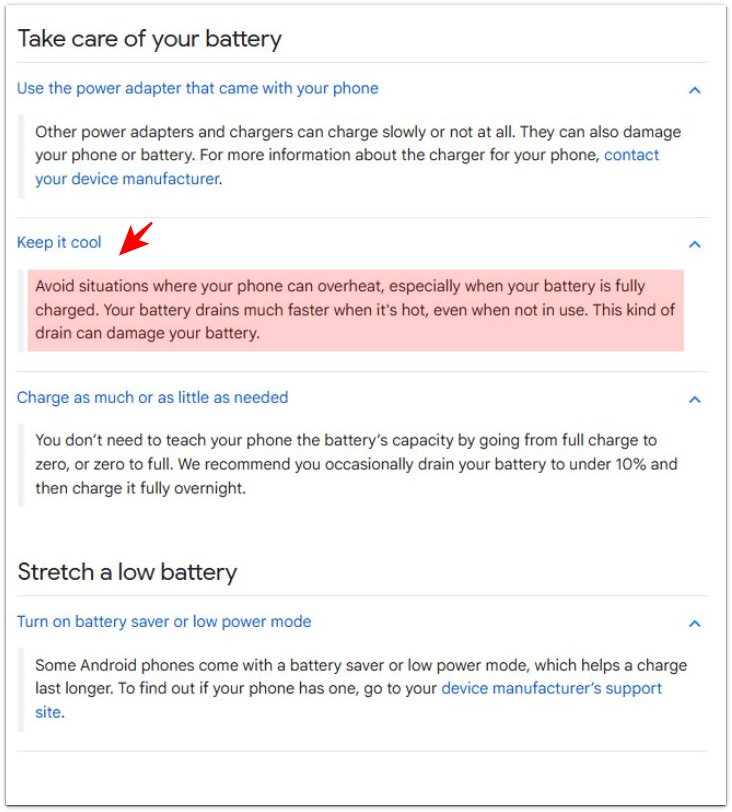
Google explains that heat makes Android batteries drain faster, even while not in use. Google also tells users to check the charger, control temperature, and use Battery Saver when battery behavior changes.
Additional Tips
Avoid judging the battery right after gaming, navigation, video calls, or fast charging. Those moments often make normal battery behavior look worse for a short time.
Track when the drop happens for one day. The time, app, charger, signal condition, and temperature often show the pattern more clearly than the percentage alone.
Use service when the same warning signs repeat across normal use, charging, and idle time.
Final Notes
Android battery problems need a full symptom check before replacement. A weak health result matters more when it repeats with slow charging, heat, early shutdowns, or screen-off battery loss.
Check the charger, heat, apps, signal, background activity, and battery status together. When one cause clearly matches the problem, fix that area first. Once several warning signs repeat together in daily use, a service check becomes the right next step.
Checklist
- Check the battery health or diagnostics result before replacement.
- Compare the health result with heat, charging, and shutdown behavior.
- Use the same charger and cable during the first charging check.
- Let the phone cool down before judging slow charging or fast drain.
- Open the battery usage screen and check the biggest app or service change.
- Compare mobile data, weak signal, navigation, video calls, and background activity.
- Check screen-off drain after the phone stays idle for a few hours.
- Get a service check when several warning signs repeat in daily use.