
Introduction
Poor battery health on Android becomes confusing when the status looks weak, but the phone still opens apps, charges, and lasts through normal use.
The screen shows a poor result, while daily use does not show an obvious failure yet. That gap needs a closer check before treating the status as a replacement decision. The steps below compare the battery status screen with runtime, charging behavior, shutdowns, and heat so the reading matches real phone behavior.
Step-by-Step Guide: Poor Battery Health on Android
Step 1: Check The Battery Screen First
Open Settings → Battery and check the built-in battery page before judging the status. Look for usage details, charging options, or any battery information your phone provides.
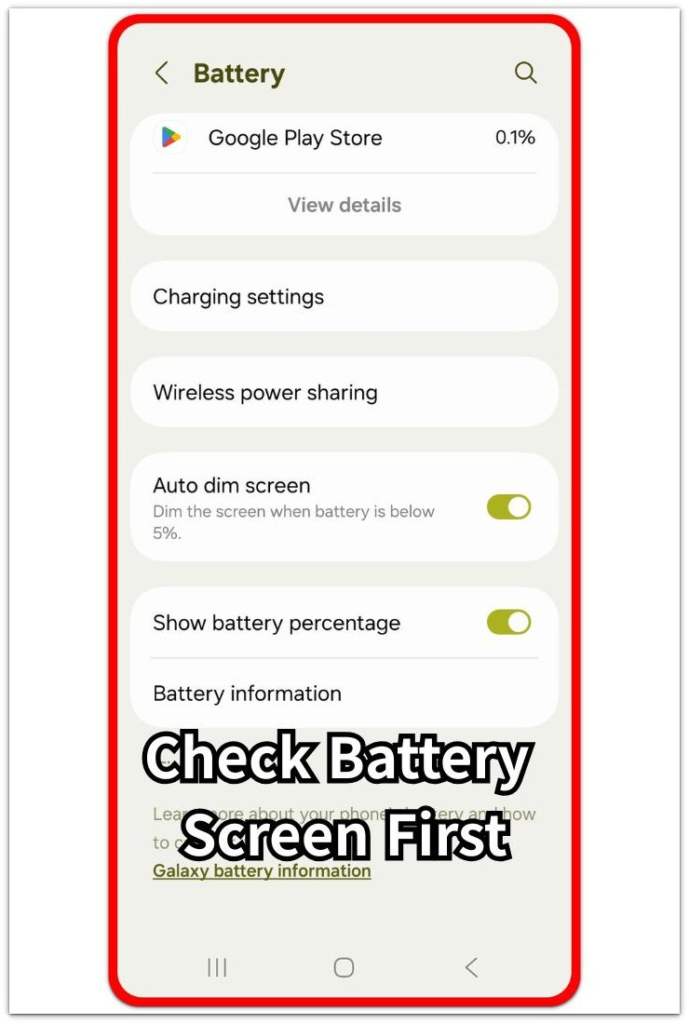
Use this screen as the first reference point. The goal is to confirm where the status comes from before comparing it with daily use.
Step 2: Compare The Result With Normal Phone Use
After checking the screen, use the phone through a normal routine. Watch whether the phone still opens apps, charges normally, and lasts through the same daily use pattern.
A poor result matters more when the phone also drains faster, shuts down early, or gets hotter than usual. When daily use still looks normal, keep it as something to compare instead of treating it as the final answer.
Step 3: Recheck After Runtime, Charging, Shutdowns, And Heat
Check again after comparing runtime, charging behavior, sudden shutdowns, and unusual heat. Use the same screen so the second check matches the first one.
When the poor result keeps returning and real-use problems appear together, the condition needs closer review. When it looks poor but the phone works normally, the next check should focus on repeated behavior, not one screen result.
Troubleshooting
Troubleshooting 1: Poor Result Shows But Daily Use Still Feels Normal
A poor result feels serious when the phone still opens apps, charges, and lasts through the usual routine. The mismatch matters because the screen result and real use are not showing the same problem yet.
Use the phone through a normal day and compare the same points: runtime, charging speed, sudden shutdowns, and unusual heat. When those parts stay normal, treat it as something to recheck instead of using it as the only reason for service.
Troubleshooting 2: The Phone Drains Faster Than Before
The result becomes more important when the phone starts dropping faster during the same routine. A shorter runtime matters most when screen time, signal condition, and app use have not changed much.
Check whether the faster drain repeats over more than one charge cycle. When the same use pattern keeps ending earlier, it matches a real use problem and needs closer review.
Troubleshooting 3: Shutdowns, Heat, Or Uneven Charging Keep Returning
It becomes harder to ignore when the phone shuts down early, gets unusually hot during basic use, or charges unevenly with a known good charger. These symptoms show that the issue is no longer only a screen reading.
Let the phone cool down, use a reliable charger, and check the same behavior again. When shutdowns, heat, or uneven charging return during normal use, the battery condition deserves service review.
Extra Section 1: Why A Poor Result Does Not Always Mean Immediate Replacement
A poor battery health reading does not always mean the battery needs immediate replacement. It becomes more useful when it matches how the phone behaves during normal use.
Treat the status as a warning sign first, not the final decision by itself. A recent update, a recent repair, or a short recheck window makes the status harder to trust when daily use still looks normal.
The safer check is consistency. The same warning becomes harder to ignore once real-use problems return with it. If the phone still lasts normally, charges normally, and stays stable, service does not need to be the next step right away.
Extra Section 2: When A Poor Result Becomes A Real Warning
A poor result becomes a stronger warning when it keeps appearing on the same battery screen. One weak result gives you a reason to compare, but repetition shows a more stable pattern.
The warning becomes clearer when the phone also loses runtime during the same routine. If the phone reaches the end of the day much earlier than before, the screen result starts to match a real battery problem.
Service review makes more sense after you check outside causes first. When the same poor result stays visible after normal temperature, reliable charging, and normal app use, the battery condition deserves closer attention.
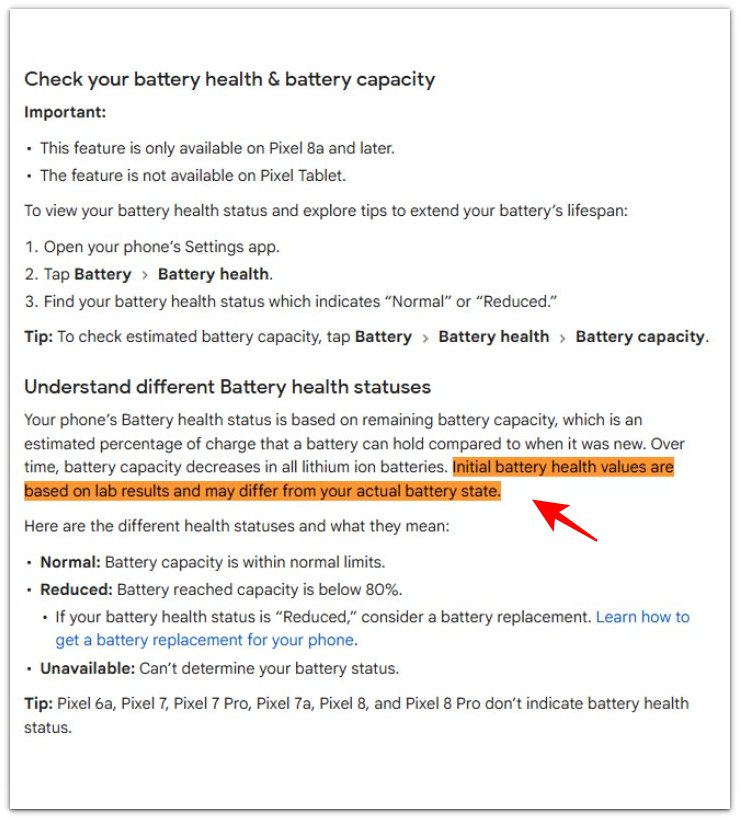
Official Source: Battery Health Values Differ From Actual Battery State
Google explains that initial battery health values are based on lab results and differ from the phone’s actual battery state in some cases. Check the battery result against real use before deciding on replacement.
Additional Tips
A new battery or recent repair needs a few normal charge cycles before the battery result becomes a useful comparison. Check the phone again after normal use, not only right after an update.
Very cold temperature or a very low charge level makes weak battery behavior look worse than usual. A swollen back cover, screen lift, or unusual chemical smell is not a normal health reading issue and needs service review right away.
Final Notes
Poor battery health on Android needs repeated checks, not one screen result alone. Use the built-in battery screen first, then compare it with normal runtime, charging behavior, shutdowns, and heat.
If the poor result keeps returning and the phone also performs worse in daily use, service review becomes the right next step. For a phone that still works normally, keep checking the same screen and judge the pattern.
Checklist
- Check the built-in screen first.
- Compare the result with normal daily use.
- Recheck the same screen after regular use.
- Watch runtime, charging, shutdowns, and heat together.
- Separate updates, repairs, cold temperature, and low charge first.
- Use service review after poor status keeps returning with real-use problems.
Use this broader guide once the poor result starts matching the way the battery behaves during normal use, charging, and the next day.