
Introduction
────────────────────────
Android Alarm Missed Overnight Due to Battery Optimization is not a random failure or a missed setting.
When this happens, the system has already restricted alarm execution during extended idle hours.
At this stage, alarm volume, tone, and configuration no longer influence execution.
Once battery optimization intervenes overnight, alarm execution shifts away from user intent entirely.
Many users still assume alarms bypass power saving rules, but modern Android no longer guarantees this behavior overnight.
Android alarm missed due to battery optimization is most commonly observed during overnight idle periods on modern Android devices.
────────────────────────
Step-by-Step Guide
────────────────────────
────────────────────────
Step 1: Confirm Battery Optimization Is Actively Managing the Alarm App
Open Settings.
Go to Apps.
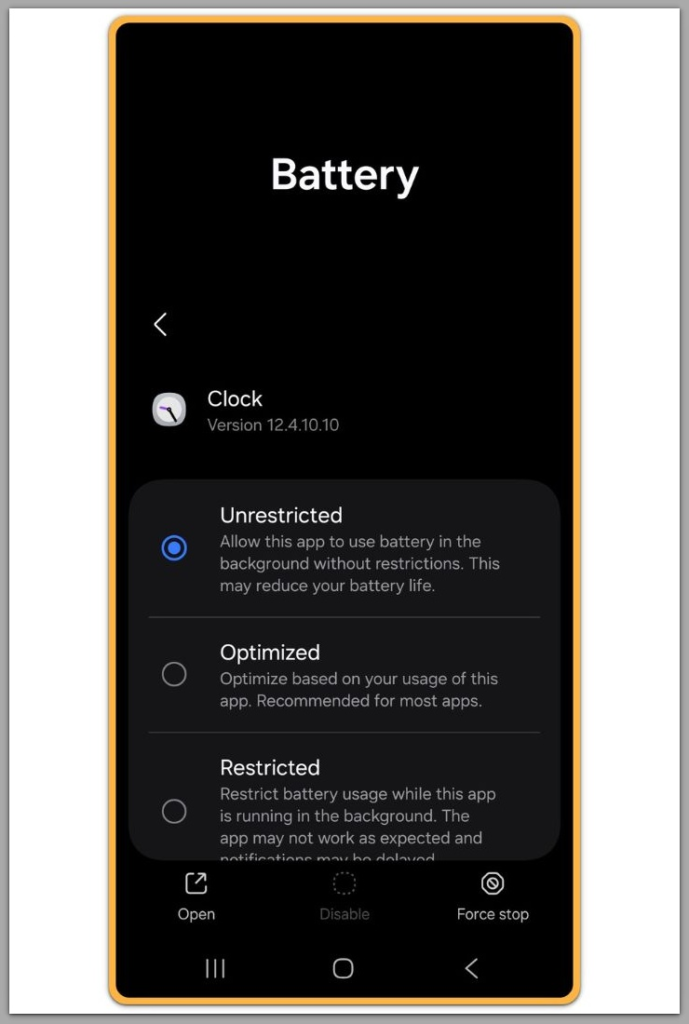
Select the clock or alarm app used overnight.
Open Battery.
If the app is set to Optimized or Restricted, Android handles it as a background process.
In this state, the system decides alarm execution rather than the user.
Alarm execution is no longer controlled by user settings beyond this point.
In this state, android alarm missed due to battery optimization may still appear even when alarm settings look correct.
────────────────────────
Step 2: Understand Why Overnight Idle Changes Alarm Priority
────────────────────────
In practice, Android enters deep idle (Doze) during long periods of inactivity.
Overnight hours almost always trigger this condition.
During deep idle, Android deprioritizes background execution by design.
As a result, the system no longer treats alarms as urgent user actions.
Instead, the system evaluates alarms as scheduled background events.
Once this classification applies, user-facing settings no longer override execution behavior.
From this point onward, this behavior results from how the system enforces idle power policy.
────────────────────────
Step 3: Check Whether the Alarm App Is Exempt — and Why That May Still Fail
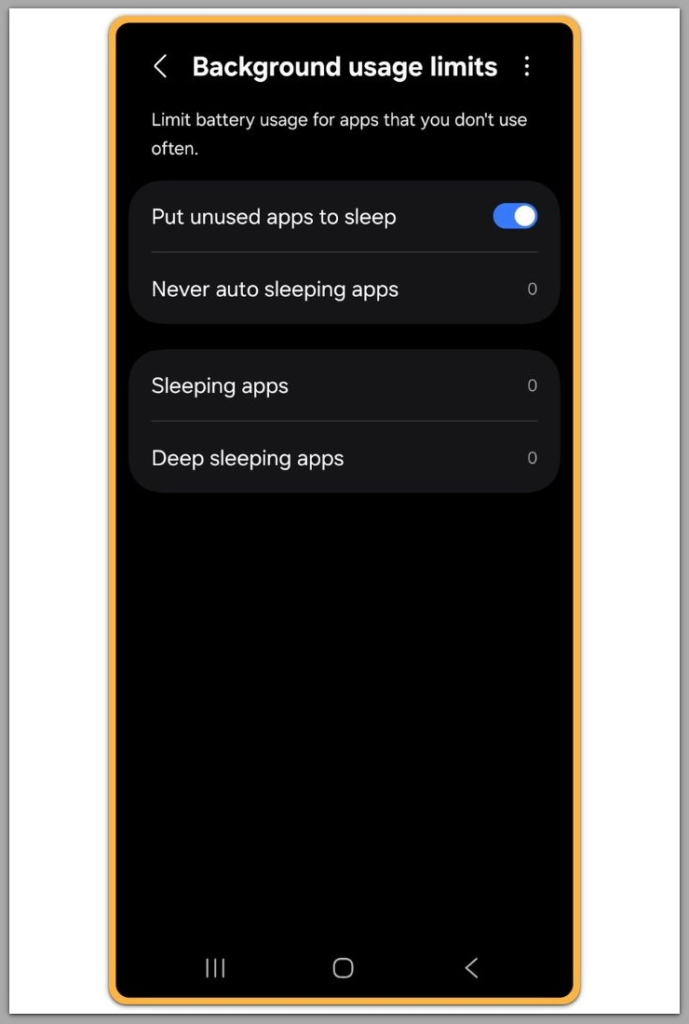
Many Android devices allow alarm apps to be marked as Unrestricted.
This option removes most app-level battery limits.
However, this exemption does not remain absolute.
Because of this, manufacturer-level power managers can still intervene.
Samsung, Xiaomi, and other OEMs apply additional standby rules beyond stock Android.
As a result, these rules may delay alarms even when the app remains marked Unrestricted.
This explains why android alarm missed due to battery optimization can persist despite correct-looking settings.
────────────────────────
Step 4: Identify the Exact Point Where User Control Ends
────────────────────────
At this point, user control ends when Android transitions from app-level rules to device-level power policy.
For this reason, no toggle restores full alarm priority once the system enforces deep idle.
Restarting the phone, clearing cache, or reinstalling the app does not change this behavior.
When the system reaches this point, android alarm missed due to battery optimization no longer remains solvable through user-accessible settings.
If the issue still persists after checking everything above, it is unlikely to be a basic settings problem.
At this stage, Android has already shifted alarm handling to device-level power policy.
In these cases, restrictions related to manufacturer power management or system-level idle enforcement usually need to be examined directly.
This requires reviewing official platform documentation rather than app settings.
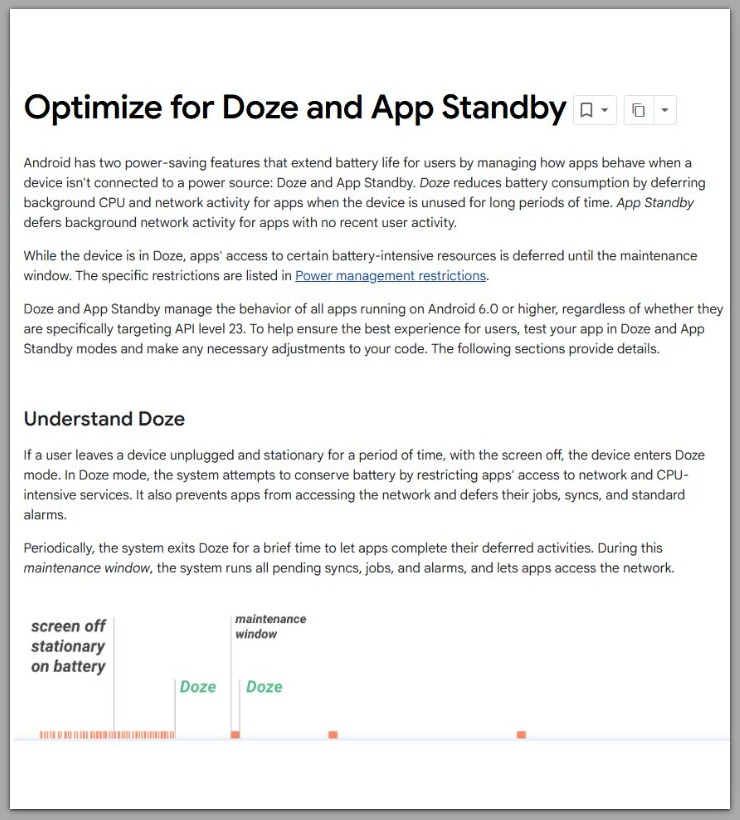
If you need further assistance, please refer to the official Android documentation below.
────────────────────────
Troubleshooting Android Alarm Missed Due to Battery Optimization
────────────────────────
Overnight-only alarm failures indicate active battery optimization.
Daytime alarms working normally confirm this pattern.
Likewise, if multiple alarm apps fail in the same way, the issue does not originate from a specific app.
This behavior points to system-level power control.
In addition, if the device includes aggressive standby or battery protection features, manufacturer rules actively operate.
These rules override standard Android behavior.
In these cases, android alarm missed due to battery optimization reflects intentional power management, not malfunction.
────────────────────────
Additional Tips
────────────────────────
For reliability, place critical alarms in the personal profile rather than restricted or work profiles.
Likewise, avoid task-killer or memory-cleaner apps that reinforce idle suppression.
When possible, keeping the device charging overnight reduces aggressive idle enforcement on many devices.
However, this lowers risk but does not restore full user control.
These steps reduce risk but never override enforced system power policy.
────────────────────────
Final Notes
────────────────────────
At this point, when an alarm fails overnight, the system has already deprioritized it.
This behavior is intentional and has become more common on modern Android devices as idle enforcement has tightened.
For this reason, android alarm missed due to battery optimization represents a boundary issue.
It marks the point where user control stops and system policy takes over.
────────────────────────
Checklist
────────────────────────
☐ Alarm app battery mode reviewed
☐ Overnight idle behavior understood
☐ Manufacturer power rules considered
☐ User control endpoint clearly identified
Once the system enforces deep idle, alarm execution no longer remains guaranteed.
────────────────────────
Extra Section 1
────────────────────────
When alarms fail overnight, users often interpret the issue as instability rather than deliberate power control.
In reality, Android prioritizes battery preservation over scheduled execution.
As a result, modern devices remain idle for long periods without charging.
Alarms become conditional events rather than mandatory actions.
This explains why android alarm missed due to battery optimization varies by device.
Each manufacturer tunes power rules differently.
The behavior remains intentional.
Consistency gives way to longer standby life.
────────────────────────
Extra Section 2
────────────────────────
At this stage, no reliable method forces alarms to bypass overnight power management.
Third-party alarm apps operate under the same execution limits as system alarms.
Because of this, system-level power policy overrides app intent first, then user settings.
Once the system enforces this order, alarm reliability becomes conditional.
Attempts to bypass these limits through system modification or root access fail on updated devices.
When android alarm missed due to battery optimization occurs, the system has already finalized that decision.