
Introduction
Android battery health reading wrong becomes confusing when the health result looks low, weak, or different from how the phone actually works. The screen shows a lower condition, but the phone still lasts through the usual routine and charges without obvious trouble.
The first check should stay on the health reading itself. Compare the same screen with daily use, charging behavior, and repeated checks before treating the number as a real battery problem.
Step-by-Step Guide: Android Battery Health Reading Wrong
Step 1: Open The Battery Health Screen First
Open the health or diagnostics screen available on your Android phone. On Pixel models that show Battery health status, start there instead of switching between different apps.
On Samsung phones without a Battery health menu, use Samsung Members → Support → Phone diagnostics → Battery status instead.
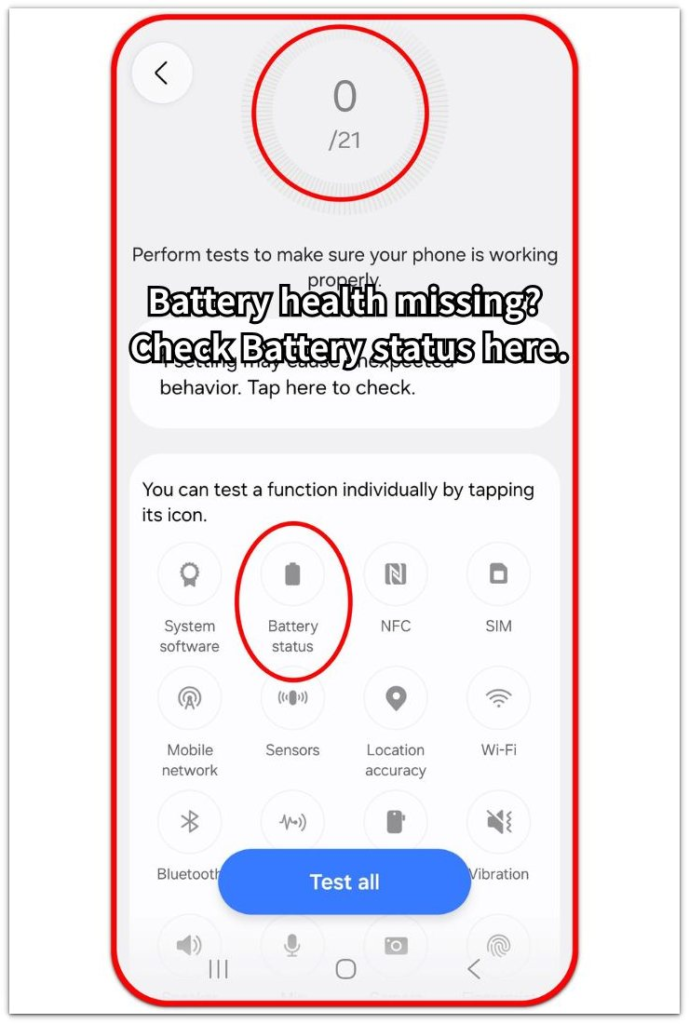
Use this first screen as the main reference. A health result is easier to understand when the first check starts from one built-in page, not from several tools that use different labels.
Step 2: Match The Result With Real Battery Symptoms
After checking the health screen, compare the result with how the phone behaves during normal use. Look at runtime, charging speed, sudden shutdowns, and unusual heat during light use.
When the screen shows a low or reduced result but the phone still works normally, treat it as a reading to compare again. When the lower result appears with shorter runtime or charging trouble, the reading deserves closer attention.
Step 3: Repeat The Same Test Before Taking Action
Use the phone normally for a while, then return to the same battery health screen and check the result again.
When the same low result appears again with shorter runtime, shutdowns, charging trouble, or unusual heat, move toward service or battery replacement review. When the next check looks normal or daily use stays stable, keep the first result as a comparison point instead of acting from one mismatched reading.
Troubleshooting
Troubleshooting 1: Battery Status Looks Weak But The Phone Still Lasts Normally
A battery health screen looks wrong when it shows a low result, but the phone still lasts through the same daily routine. A single low reading does not prove battery failure when runtime, charging, and temperature still feel normal.
Use the phone through a normal day and watch runtime, charging speed, sudden shutdowns, and unusual heat. When those parts stay stable, treat the reading as something to check again instead of acting on it right away.
Troubleshooting 2: The Result Changes After Charging
Battery status often changes after the phone has just finished charging, cooled down, or gone through heavy use. A check right after charging or heat often looks worse than a normal-use check.
Let the phone return to normal temperature, then use it normally before checking the same health path again. When the lower result appears only around charging or heat, use the normal-use check as the better comparison point.
Troubleshooting 3: Battery Status Stays Weak And Real Use Gets Worse
A weak health result becomes more important when daily use gets worse at the same time. Shorter runtime, unstable charging, sudden shutdowns, or unusual heat give the screen result more weight than a low number by itself.
Check the same built-in screen again after normal use. When the weak result keeps returning and the phone shows real symptoms, treat it as a service or replacement review point instead of another reading to ignore.
Extra Section 1: Why The Reading And Daily Use Feel Different
A health screen does not measure a full day of use. It shows a diagnostic result from the test moment.
Daily use includes screen time, charging habits, app load, signal strength, and temperature across many hours. These conditions make the phone feel normal even when the result looks lower.
That difference is why android battery health reading wrong feels confusing. Treat the result as a comparison point first, then judge it with repeated checks from the built-in screen.
Extra Section 2: Why One Health Screen Matters
One health screen keeps the comparison clean. A built-in result and a number from another app often use different methods, so mixing them makes the change harder to understand.
Use the built-in path as the main reference each time. This keeps the check tied to one place instead of comparing different tools, labels, and timing.
A clear comparison matters more than chasing every number. When the reading stays stable, the phone is easier to judge. When the result keeps dropping from that same place, the next step becomes clearer.
Official Source: Battery Health Values Differ From Actual State
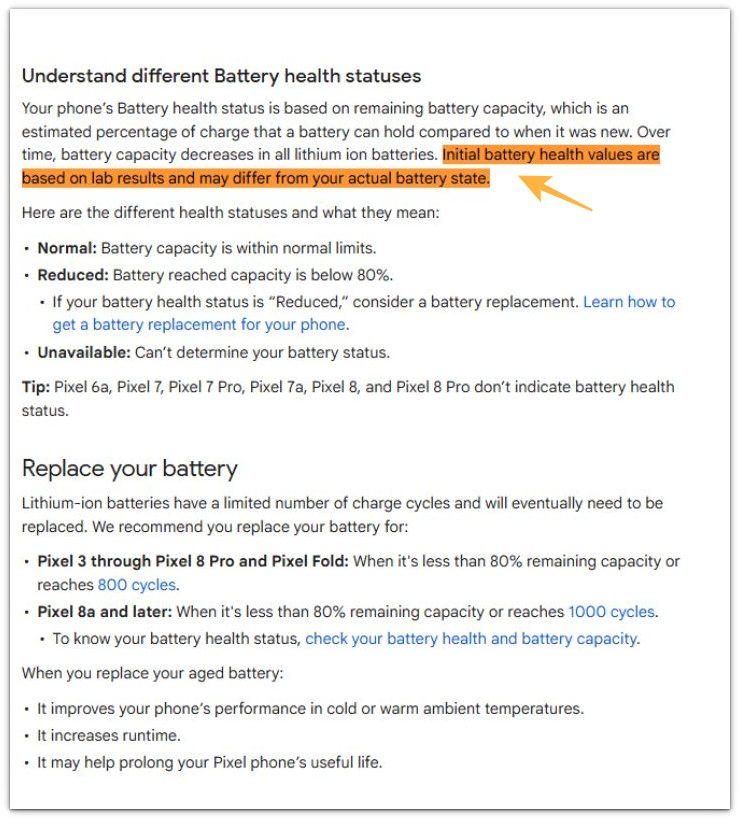
Google explains that initial health values are based on lab results and do not always match the actual state. This supports checking the reading again before treating one low result as a confirmed problem.
Additional Tips
A missing Battery health menu on some Android phones changes the path, not the logic of the check. A recent battery replacement also needs a few normal charge cycles before the health reading becomes useful as a comparison.
Third-party battery apps work better as side notes than as the main health source because their labels and estimates often differ. A low health result carries more weight when the same built-in screen keeps showing it across normal use.
Final Notes
Android battery health reading wrong needs one steady comparison, not one scary screen result.
Use the built-in health screen first, compare it with daily use, then repeat the same check before making a repair decision. A low reading becomes important when the same result keeps returning and the phone no longer behaves normally.
Checklist
- Check the built-in Battery health screen first.
- Use diagnostics as a backup when the phone has no Battery health menu.
- Compare the reading with normal runtime, charging, shutdowns, and heat.
- Repeat the same check from the same screen.
- Treat one low result as a comparison point, not final proof.
- Review service or replacement only when the low reading keeps returning with real use problems.
For a broader check, the guide above helps you separate a weak-looking Battery health result from a battery problem.