
Introduction
Android battery health dropping fast feels worrying when the health result looks lower than the last time you checked it.
You open the same screen again and wonder why the phone seems to have aged so quickly, but one lower result does not prove the battery failed. Check whether the lower result keeps moving down after normal charging and normal use before you blame the battery itself.
Step-by-Step Guide: Android Battery Health Dropping Fast
Step 1: Check The Same Screen First
Start with the screen where you first noticed the lower result, then open that same screen again before restarting the phone, changing charging habits, or judging the battery.
The first check is easier to compare when it starts from the same place. A different app or menu gives you another number, but it does not show whether the original reading is really changing.
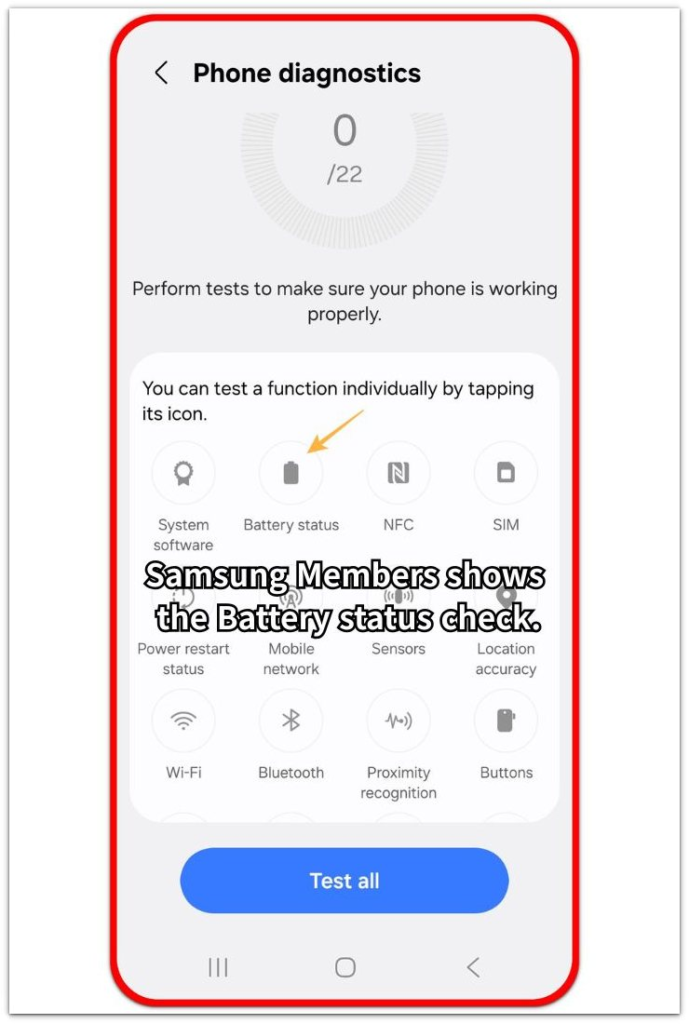
Use this first check as the baseline before comparing anything else.
Step 2: Check Again After Regular Use
Charge the phone the way you normally do, then use it for a while before opening the same screen again.
Avoid forcing a full drain, keeping the phone plugged in all day, or changing battery protection settings just to test the result. The second check matters more after the phone goes through its usual routine.
When the number looks the same, treat the first low result as a reading to watch. When it drops again, move to the next check.
Step 3: Watch Whether The Lower Result Keeps Moving Down
Write down the current result and check again after another regular use period.
A single lower result is weaker than a result that keeps moving down across more than one check. Use the same phone, the same screen, and the same kind of daily use so the comparison stays clear.
When the lower result keeps dropping and the phone also lasts less, shuts down early, charges unevenly, or gets unusually hot, take the reading more seriously.
Troubleshooting
Troubleshooting 1: The Result Drops After A Software Update
A software update sometimes changes how the battery screen reads or displays the result. The lower number looks sudden because it appears after the update, even when daily use has not changed much.
Restart the phone once after the update finishes, then check the same screen again after regular use. When the result stays lower but stops falling, treat it as a new reading to watch instead of proof that the battery failed overnight.
Troubleshooting 2: The Number Falls But Daily Use Still Feels Normal
A lower result matters more when it matches real battery symptoms. When the phone still lasts through the same routine, charges normally, and does not shut down early, the screen result needs more comparison before any repair decision.
Watch the phone during the same kind of day you usually have. A screen result that changes without shorter battery life is weaker than a result that drops together with clear daily-use problems.
Troubleshooting 3: A Different App Shows A Different Result
A third-party battery app or a different menu sometimes shows another number from the built-in screen. That difference makes the drop look worse when the two screens are showing separate estimates.
Return to the same screen you used first and compare only that reading after regular charging and use. When the built-in result stays steady, treat the other number as a separate reference instead of the main repair signal.
Extra Section 1: Why A Fast Drop Looks Worse Than It Is
A fast drop looks serious because the screen shows one clear number or status. The result feels like a direct health report, so a lower reading looks like sudden damage.
That screen is not the same as watching power drain in real time. It shows a health estimate, and the estimate often looks sharper than the change you actually feel during daily use.
The lower result deserves attention, but it should not control the whole judgment by itself. Treat it as a warning sign to compare with later readings, not as final proof that the battery has failed.
Extra Section 2: When A Fast Drop Starts To Matter
A fast drop matters more when the lower reading appears with clear symptoms. Shorter runtime, sudden shutdowns, unstable charging, or unusual heat make the result stronger than the number alone.
The pattern also matters. One lower reading is a weak signal, but repeated drops with the same kind of use show a stronger change in condition.
Use the screen result and the phone’s behavior together. When the reading keeps dropping and daily use gets worse too, get a service check or review whether replacement makes sense.
Official Source: Pixel Battery Capacity Is An Estimate
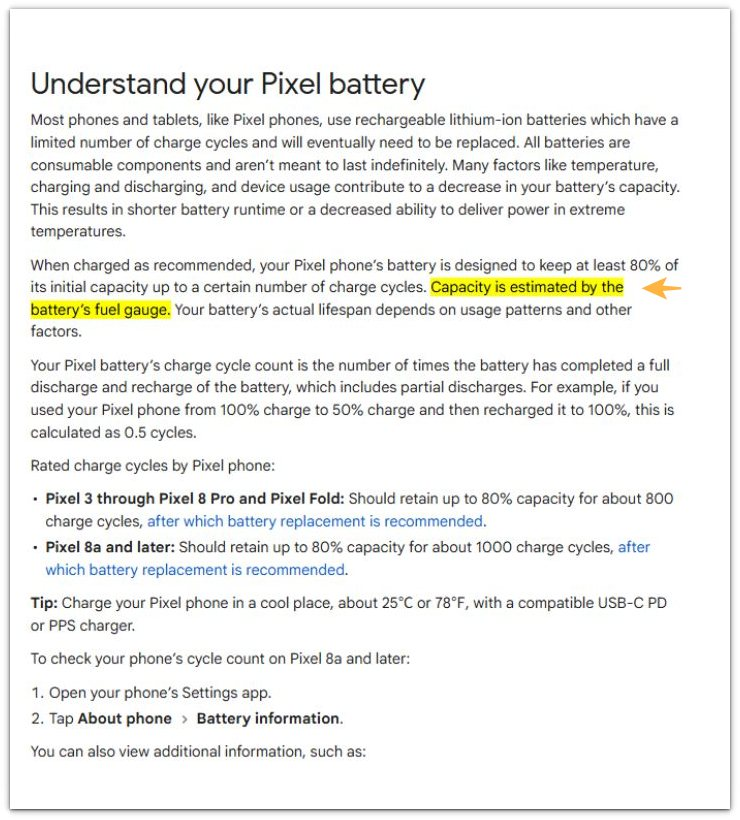
Google Pixel Help says the battery’s fuel gauge estimates battery capacity. This supports treating one fast health drop as a reading to compare, not final proof of sudden failure.
Additional Tips
Use one health screen as the main reference. A second app works only as a reference, so it should not replace the screen you started with.
Check the result at similar charge levels when possible. A health reading checked at very different moments makes the change look more confusing.
Keep repair history in mind. An old part, a recent replacement, or heavy heat exposure needs a different level of attention from a phone that still works normally.
Final Notes
Android battery health dropping fast matters most when the lower result keeps falling and the phone shows real symptoms at the same time.
One low reading is a warning sign to track. A repeated drop with shorter runtime, shutdowns, unstable charging, or unusual heat is a stronger sign that the phone needs a service check or battery replacement review.
Compare the pattern and judge the number together with daily behavior. This keeps one sudden result from making the decision for you.
Checklist
- Check the same health screen first.
- Use regular charging and normal use before judging it.
- Compare the result across more than one check.
- Treat one low reading as a warning sign, not final proof.
- Watch for shorter runtime, shutdowns, unstable charging, or unusual heat.
- Use a service check or battery replacement review when repeated drops match real symptoms.
The guide above is a good next step if the battery itself now looks like the problem, not just one bad day.