
Introduction
Android phone overheating with hotspot on becomes noticeable when the phone gets hot while it shares mobile data with another device. The connected device keeps using the data connection, and the temperature rises during the sharing session.
The first check is the exact condition around that session. The steps below separate the connected device, charging state, signal level, and data use one by one.
Step-by-Step Guide: Android Phone Overheating With Hotspot On
Step 1: Turn On Mobile Hotspot First
Open Settings → Connections → Mobile Hotspot and Tethering. Turn Mobile Hotspot on before you connect another device, so the first check starts from the same screen each time.
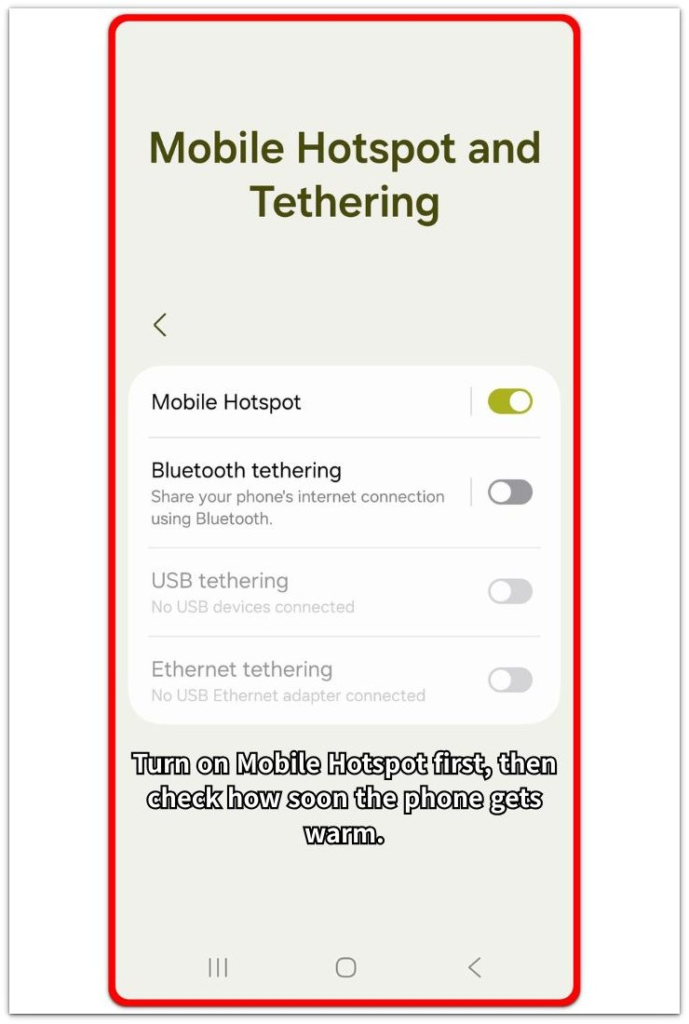
Use the phone the way you normally do while the hotspot stays active. Keep the charging state and the connected device unchanged for the first check. Check how soon the phone starts getting hot after the connection begins.
Step 2: Check What The Connected Device Is Doing
Look at the device using the data connection. Check whether it is streaming video, downloading files, updating apps, or syncing in the background.
Keep sharing on, but stop heavy use on that device for a short test. A slower temperature rise after that change shows that data use is the main load, not the hotspot switch itself.
Step 3: Compare Charging And Signal During The Same Hotspot Session
Run the same hotspot session again without changing everything at once. Keep the same position and connected device first. Then unplug the charger for one test, or move to stronger reception for another test.
Compare the phone body after a few minutes. A cooler result after only one condition changes keeps the next fix focused on the session setup instead of the battery settings first.
Troubleshooting
Troubleshooting 1: Android Phone Overheating With Hotspot On Only While Charging
The phone becomes warmer sooner when the charger stays connected during data sharing. The other device keeps using data, and charging adds another load at the same time.
Unplug the charger for a short test and keep the same task running on the connected device. A slower warm-up without charging shows that the charging setup is adding to the problem, so test a different charger, cable, or charging position before changing sharing settings.
Troubleshooting 2: The Connected Device Uses Too Much Data
The phone gets hot only when the other device streams video, downloads files, updates apps, or syncs in the background. The hotspot stays on in both tests, but the problem follows heavy use from that device.
Pause the heavy task and keep the connection active for a few more minutes. A cooler result after data use drops ties the heat to that device, so limit downloads or background syncing during the session.
Troubleshooting 3: Hotspot Gets Hot Faster In Weak Signal Areas
The phone warms up sooner in a car, basement, parking structure, or a room with low signal bars. It is sharing data, but it also has to hold the mobile network connection in a weaker spot.
Move to stronger reception and run the same test again. A slower temperature rise in better signal leads back to the location, so use the connection where reception stays stronger before changing battery settings.
Extra Section 1: Why Hotspot Heat Feels Worse In Cars Or Small Rooms
Hotspot heat often feels worse when the phone sits where warm air cannot move away from the body. A car dashboard, a closed cup holder, a crowded desk, or a small room with poor airflow makes the same sharing session feel hotter than it does in an open area.
The phone is not only sharing mobile data in that moment. It is also holding heat against the same surface while the session keeps running.
Move it away from direct sunlight, take it out of a tight space, and place it where air moves around the phone before testing the same connection again. A cooler result after the position changes shows that the setup around the phone was making the heat feel worse.
Extra Section 2: Why Long Hotspot Sessions Make The Phone Stay Warm
A short hotspot test looks normal when the phone shares data for only a few minutes. The problem becomes clearer when the same connection stays active through a long laptop session, online meeting, or extended browsing period.
The phone does not always become hot right away. It starts only slightly warm, then holds that warmth as the session continues without a real break.
End the connection for a few minutes and let the phone sit unused before starting the same session again. A cooler restart shows that the session length was letting heat build up, even when the connection looked normal at first.
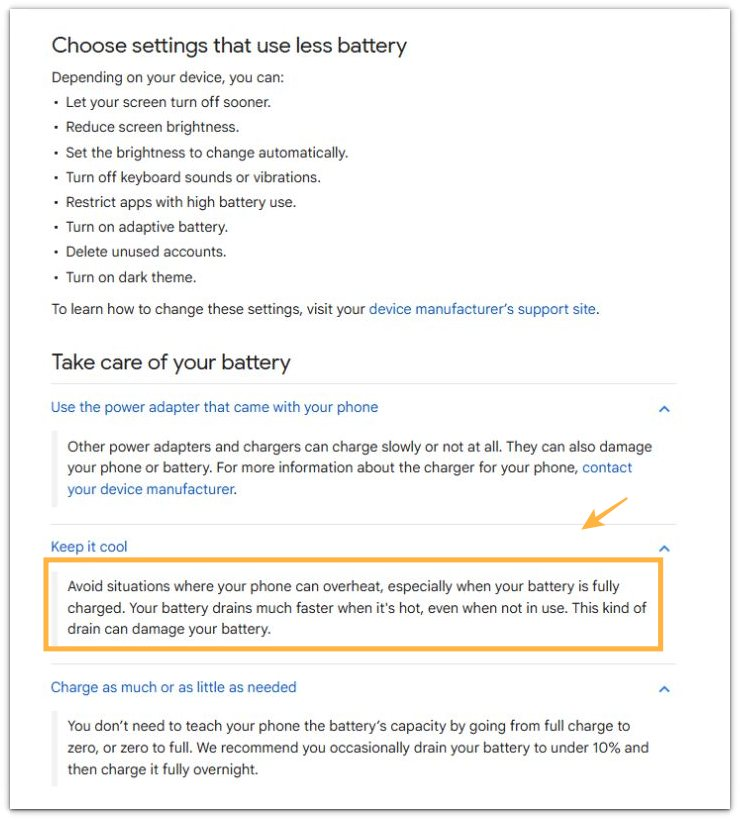
Official Source: Google Says Heat Makes Battery Drain Faster
Google’s battery guidance says to avoid situations that overheat the phone. It also explains that the battery drains much faster when the phone is hot, even when not in use.
That supports the hotspot checks above because data sharing already keeps the phone active. Charging, weak reception, poor airflow, or a long session makes that heat harder to control.
Additional Tips
A thick case traps warmth during a long hotspot session. Remove the case for a short test if the phone stays warm even after the main checks.
A pocket, bag, blanket, or soft surface keeps heat close to the phone body. Place the phone on a hard open surface while sharing mobile data.
Battery Saver helps more during light sharing, but it does not fix a hot setup by itself. The session still needs a cooler place, lighter connected-device use, and a stable signal.
Final Notes
Android phone overheating with hotspot on usually comes down to the condition around the sharing session. Heavy use from the connected device, charging, weak reception, poor airflow, and long sessions all make the phone work harder while mobile data stays active.
The right fix starts with the session itself, not the battery settings first. A cooler result after changing one condition shows the real cause, so the next step becomes clear before you replace cables, change settings, or blame the phone.
Checklist
- Check the connected device before changing phone settings.
- Compare the same sharing session without charging.
- Test the same session in stronger reception.
- Keep the phone on a hard open surface.
- Remove a thick case during a short heat test.
- Use Battery Saver only after you check the setup.
If you need more help, check the main overheating guide.