
Introduction
Android phone overheating during video calls becomes noticeable when the phone gets hot soon after the call starts. The call is still active, and the warm area appears while the other person’s video remains on the screen.
This feels different from a normal voice call because the temperature rises early in the session. The first check is whether the heat starts right after the video connection begins or only after the call has stayed open for a while.
Step-by-Step Guide: Android Phone Overheating During Video Calls
Step 1: Check The Phone Before The Video Call Starts
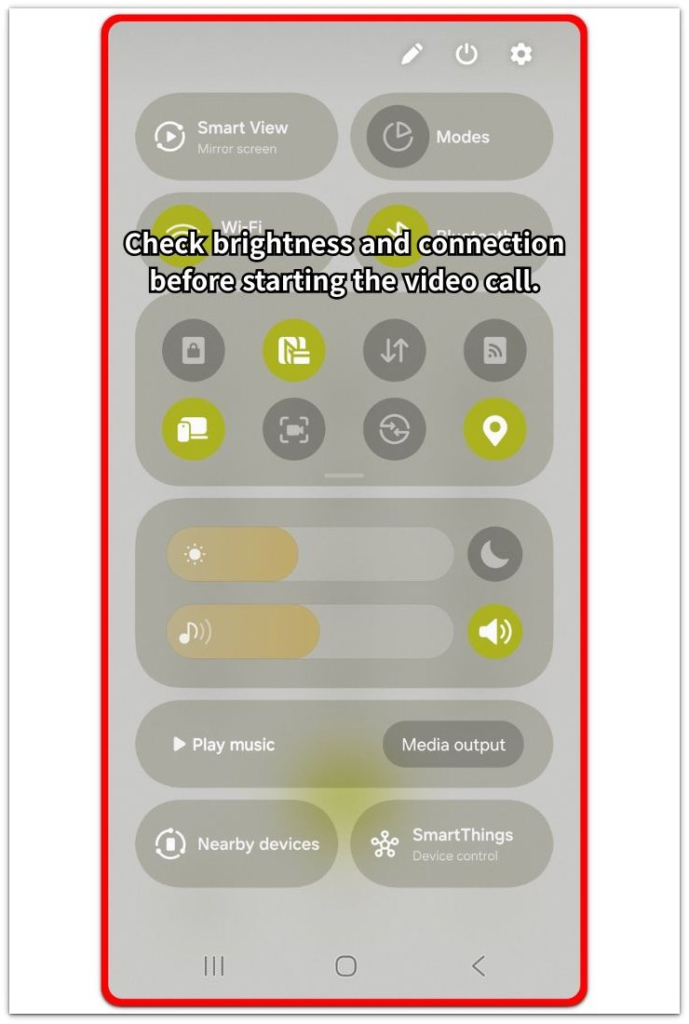
Open the quick settings panel before you start. Check the brightness level and whether the phone is using Wi-Fi or mobile data.
Leave the setup unchanged for the first test. The first check needs to show how the phone starts the call under the same brightness and connection state. Start it, then watch how soon the phone begins to feel warm.
Step 2: Compare With Fewer Apps Open
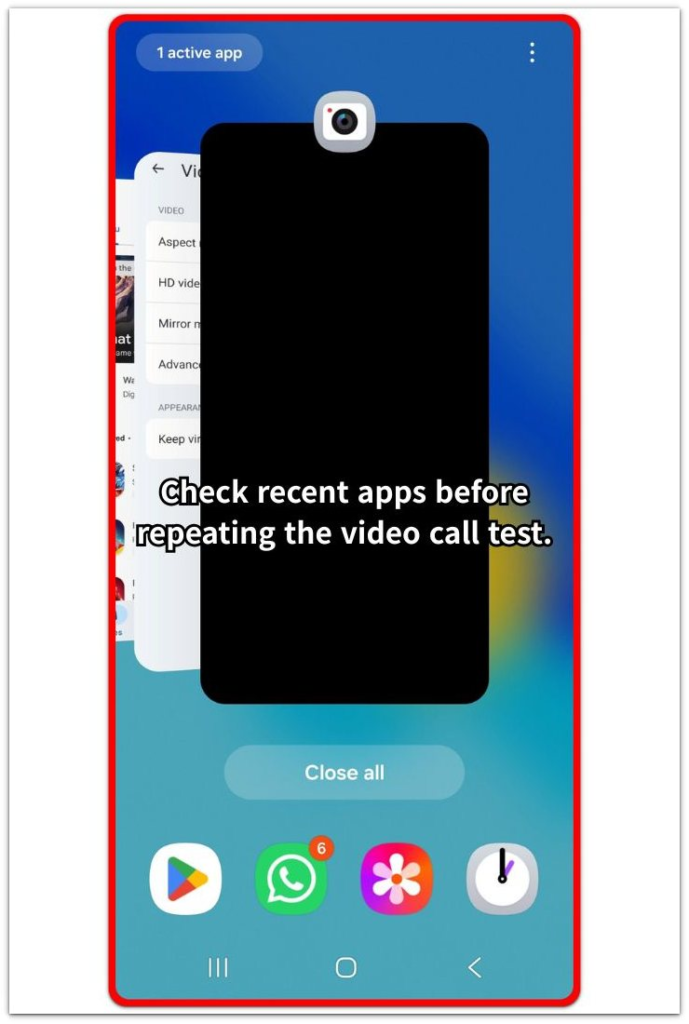
End the call and open the recent apps screen. Check whether other apps stayed open behind it, especially messaging apps, video apps, camera-related apps, or apps that keep syncing.
Close only the apps that do not need to stay open, then repeat the same check. Keep the length close to the first test. A cooler result the second time shows that extra open apps were adding load during the first session.
Step 3: Check Whether The Phone Gets Hot In The Same App Every Time
Use the same app again for a short test. Compare it with another app only when you normally use more than one. Keep the place, connection, brightness, and call length as close as possible.
The result should show whether the problem follows one app or appears more broadly. When only one app makes the phone hot early, keep the next check focused on that app before changing phone-wide settings.
Troubleshooting
Troubleshooting 1: Video Calls Heat Up Faster Only While Charging
The phone gets hot faster when video stays active while the phone charges. The setup feels more stable without charging, but the temperature rises early when charging and video stay active together.
Unplug the charger for a short test and keep the app open for a similar length of time. A slower temperature rise without charging shows that the charging setup is adding load, so test a different charger, cable, or charging position before changing app settings.
Troubleshooting 2: Video Calls Heat Up Faster On Mobile Data
The phone stays more stable on Wi-Fi, then gets hot early on mobile data. The app looks the same, but the connection type changes how hard the phone works during the session.
Repeat the short check on Wi-Fi in the same place, then compare it with mobile data. When the problem follows mobile data, use Wi-Fi for longer calls in that area or move to stronger reception before changing app settings.
Troubleshooting 3: One Contact Or Group Setup Makes The Phone Hot Faster
The phone heats up early during a specific group call or repeated setup. Other uses feel normal, but the problem returns when more people join or heavier video activity runs.
Run a shorter one-on-one check in the same app and compare the result. When the phone stays cooler in the smaller test, the heavier setup is causing the issue, so reduce the length or lower the video load for that type.
Extra Section 1: When Video Calls Heat The Phone Even Without Heavy Apps
A video call looks like one simple app on the screen, but the phone handles several tasks at the same time. The camera stays active, the microphone keeps working, sound keeps playing, and the screen remains on while the connection stays live.
Android phone overheating during video calls appears even when no heavy game or large download is open. The phone is not only showing the other person. It is also recording, sending, receiving, and displaying video without a break.
That pattern feels confusing because the app list looks clean after you close the extra apps. A cleaner app list helps remove extra load, but it does not make live video light. When the phone gets warm under that setup, the next check should stay focused on that behavior, not on random apps that are not part of it.
Extra Section 2: Why Longer Video Calls Make The Phone Warmer After A Few Minutes
Some video calls start normally, then the phone becomes warmer after the screen stays active for several minutes. The first minute does not always show the full pattern because the camera, screen, audio, and connection keep working without a break.
The warm area often becomes easier to notice after it has stayed open for a while. The phone is not reacting to one single tap or one short action. It is holding the live video session long enough for temperature to build up.
That timing matters when you compare results. A one-minute test and ten minutes of use do not show the same condition. Keep the length close between tests, then judge whether the temperature rises only after several minutes.
Official Source: Google Explains Safe Phone Temperature Limits
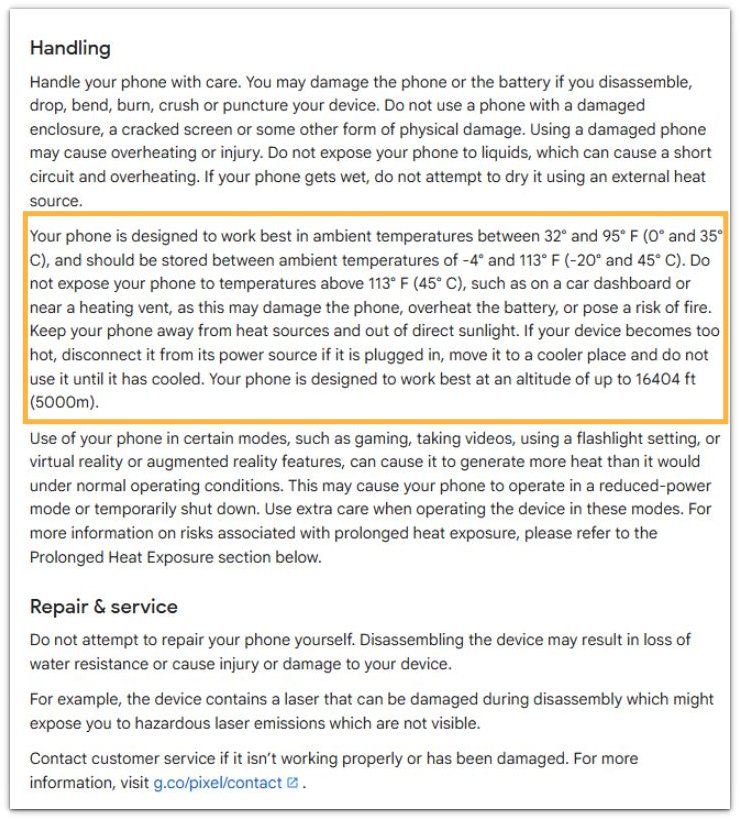
Google says Pixel phones work best between 32°F and 95°F. Google also advises keeping the phone away from heat sources and direct sunlight, disconnecting it from power when it becomes too hot, moving it to a cooler place, and not using it until it has cooled.
Additional Tips
Heat builds faster when the phone sits under a blanket, pillow, or thick case during use. Place it on a hard surface afterward so the body has room to cool.
A dirty front camera area also affects video call quality. Wipe the camera glass once before blaming the app, especially when the picture looks soft during the call.
Bluetooth earbuds add another device link during the same session. Test once with the phone speaker when the warm area appears mainly with earbuds connected.
Final Notes
Android phone overheating during video calls needs a condition-by-condition check, not random setting changes. The clearest result comes from comparing the call length, the connection, and the app setup before changing anything else.
A phone that gets hot only while charging, only on mobile data, or only in a heavier group call already shows a narrow cause. Once that pattern is clear, the fix should follow that condition first. Random battery changes come last, not first.
Checklist
- Check the phone before starting.
- Compare with fewer apps open.
- Test whether the problem follows one video call app.
- Check charging, mobile data, and group calls separately.
- Keep the length similar when comparing results.
- Fix the matching condition before changing random battery settings.
The same heating pattern in other situations is a sign to check the main overheating guide next.