
Introduction
Robocalls are annoying because they often look like normal calls at first. The phone rings, the number looks local, and the message sounds serious enough to make you pick up.
Many of these calls use a recorded voice, a fake business name, or an urgent warning to make the call feel real. By the time you notice the pattern, the same type of call has already interrupted your phone again.
For how to stop robocalls on android, the main checks are spam warnings, call blocking, and unknown caller settings. These options help reduce repeated spam without blocking every real person who tries to reach you.
This guide focuses on Android phone settings and carrier tools that reduce suspicious calls before they keep interrupting your day.
Step-by-Step Guide
Step 1: Turn On Spam Protection in the Phone App
Start with the Phone app before changing wider Android settings. Open the Phone app, tap the menu button, and look for Settings or Call settings.
Find Caller ID, spam protection, spam and call screen, or a similar spam call option. Turn on the warning option first so the Phone app labels suspicious calls before you answer.
The wording changes by phone brand or carrier, so look for the spam call setting instead of one exact menu name. This first check makes how to stop robocalls on android easier because the phone separates normal calls from suspicious calls before you use stronger blocking.
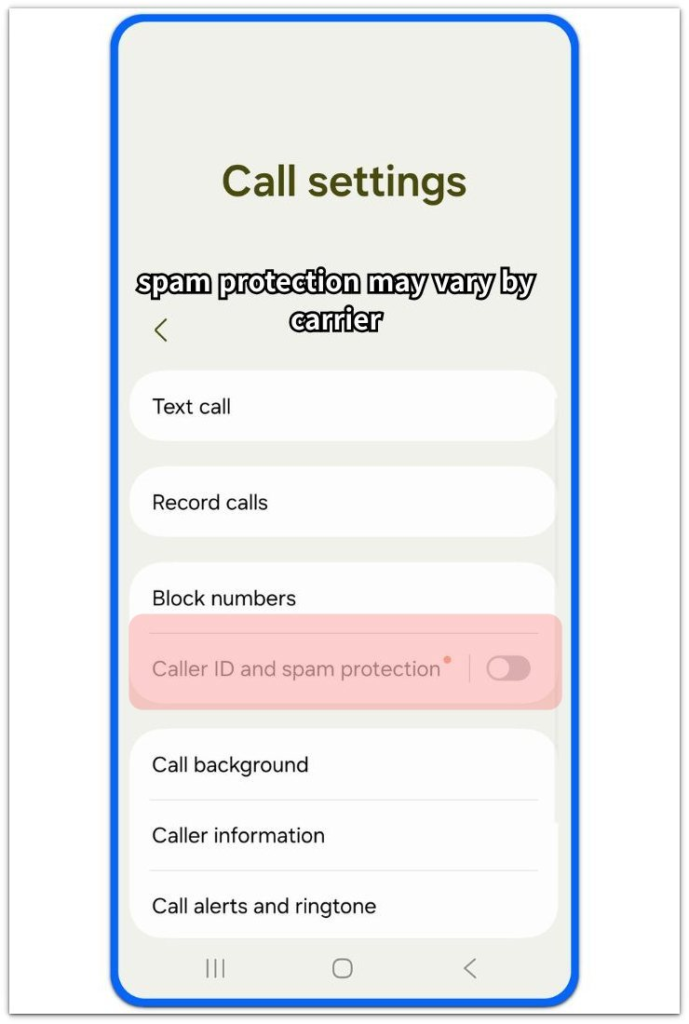
The Caller ID and spam protection setting appears differently on some Galaxy phones depending on the SIM, carrier, and phone model.
Step 2: Block High-Risk Spam and Hidden Callers
After turning on spam protection, check the stronger blocking options in the same call settings area. Look for Block spam calls, Block high-risk spam, Auto block spam, or Block private and unknown numbers.
Turn on the high-risk spam option first when your phone offers it. Use private or hidden number blocking carefully if you expect calls from doctors, delivery drivers, schools, banks, or repair services.
A strong block setting reduces interruptions, but it also silences real callers who are not in your contacts. Check the recent call log after turning it on to see whether the phone is blocking the right type of calls.
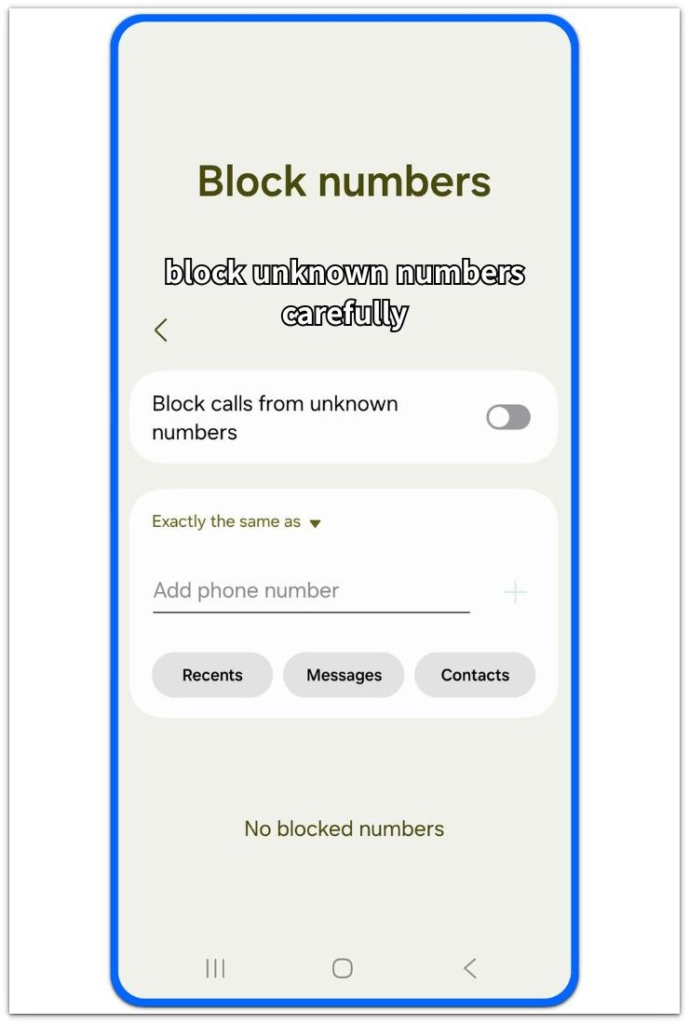
Use unknown-number blocking as a last step because many real callers are not in your Contacts.
Step 3: Add Carrier Protection and Report Repeat Robocalls
Phone settings do not catch every robocall by themselves. Open your carrier’s official spam protection app or account app and check the call protection section.
Verizon, AT&T, T-Mobile, Google Fi, Visible, and other carriers often provide their own call filtering tools. Use the official carrier app only, not a random call blocker that asks for too much access.
When a robocall still gets through, open the call history and mark it as spam or report it. That report helps the spam filter recognize repeat callers, and your call log shows which numbers keep coming back.
Troubleshooting
Troubleshooting 1: Robocalls Still Ring After Spam Protection Is On
Spam protection does not stop every robocall right away. Open the Phone app and check whether it labeled, missed, blocked, or showed the call as a normal number.
Open the number in your call history and mark it as spam. how to stop robocalls on android works better when you report repeat callers instead of ignoring them.
Restart the phone if spam labels stop appearing or the Phone app feels stuck.
Troubleshooting 2: Unknown Caller Blocking Stops Too Many Real Calls
Unknown caller blocking also silences real calls. Doctors, delivery drivers, schools, banks, repair shops, and new contacts do not always call from saved numbers.
Check missed calls and voicemail before treating every unknown number as spam. When the block setting silences important calls, keep high-risk spam blocking on and turn private or unknown caller blocking off.
Use Starred Contacts or Do Not Disturb exceptions only for people who must always reach you.
Troubleshooting 3: The Carrier App Is On, But Robocalls Still Get Through
A carrier app does not help much when its protection feature is off. Open the carrier app and check whether call protection, spam filter, scam blocking, or fraud protection is active.
Some carrier tools also need account sign-in, phone number verification, or call permission. Use only the official app from your carrier, not a random call blocker with unclear permissions.
When repeat robocalls still get through, report the number in both the Phone app and the carrier app.
Extra Section 1: Use Starred Contacts Before Blocking Too Much
Starred Contacts are useful when you want fewer robocalls without missing important people. Open the Contacts app and mark family, close work contacts, doctors, school numbers, or emergency contacts as starred.
Then open Do Not Disturb and allow calls from Starred Contacts. This keeps unknown callers quiet during Do Not Disturb while trusted people still ring through.
how to stop robocalls on android becomes safer when important callers have a clear way to reach you. Use this before you block every unknown number, especially when doctors, schools, delivery services, or repair shops still need to reach you.
Extra Section 2: How To Stop Robocalls On Android With Low-Trust Signups
Use a second number or email signup when a website asks for your phone number but does not truly need it. Public forms, giveaway pages, and random app signups often lead to more unwanted calls later.
Keep your main number for banks, work, medical offices, delivery accounts, and people you actually know. For low-trust signups, use a separate contact method so you do not spread your real number across low-trust sites.
This does not block robocalls already reaching your phone, but it gives fewer sites a chance to collect your number again.
Additional Tips
Avoid putting your phone number on public pages, comment sections, giveaway forms, or apps you do not trust.
Review app permissions and remove apps that ask for contact access without a clear reason.
Skip suspicious voicemail callbacks from unknown numbers, especially when the message sounds urgent or unclear.
A real caller usually leaves a clear message, while a robocall often pushes you to call back too quickly.
Final Notes
Robocalls are easier to control when the Phone app, carrier filter, and call history work together. The Phone app warns you before you answer, the carrier filter blocks more calls before they reach the phone, and repeat-call reports help both filters catch the same type of call again.
how to stop robocalls on android is not about one perfect setting. The problem needs a closer check when the same suspicious calls keep reaching you after spam protection, carrier filtering, and repeat-call reporting are already active.
Checklist
- Open the Phone app and turn on spam protection.
- Check whether the Phone app labels suspicious calls before you answer.
- Turn on high-risk spam blocking before blocking every unknown caller.
- Keep private or unknown caller blocking off when the block setting silences important real calls.
- Use only the official spam protection app from your carrier.
- Report repeat robocalls from the call history and keep carrier filtering active.